
To edit the project staff:
1. Click the Project Details button to navigate to the Project Details page. The Details button can be accessed from the Landing page, Dashboard or Submittals/Transmittals page.
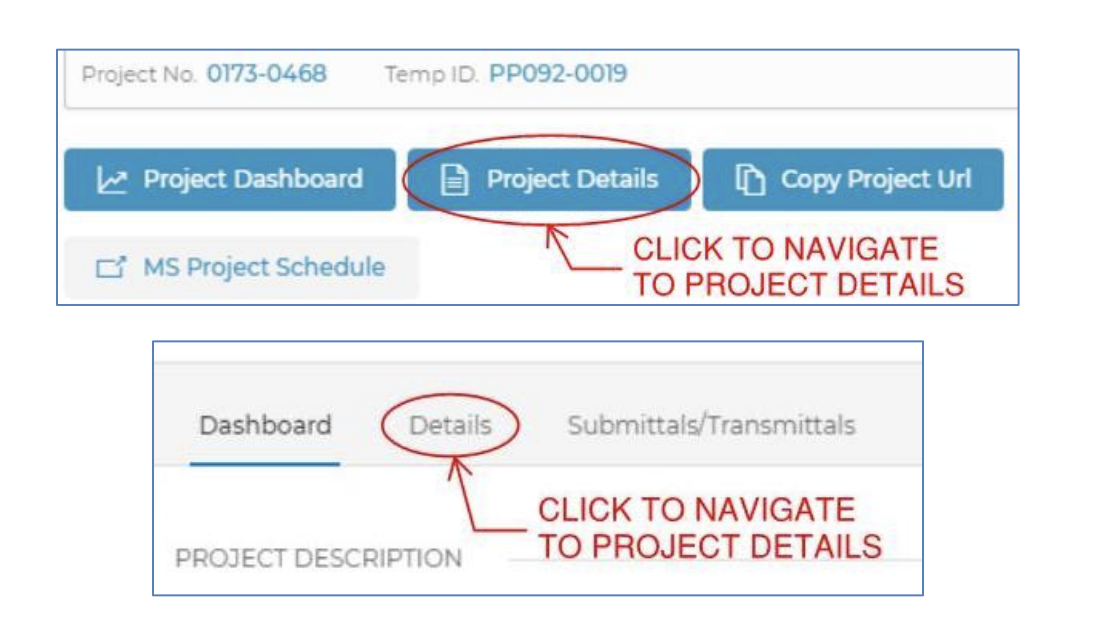
2. Click Edit in the Staff section of the Details page.
3. Add all project staff to the page. Press Show and Hide to expand or conceal the different staff categories.
- Engineering Lead Unit Staff: Only one CTDOT unit is to be added to this section. The Transportation Supervising Engineer (TSE) should be the highest level employee added to this section. Unit, title and contact information will automatically populate once a name is added.
- Engineering Support Unit Staff: All CTDOT engineering support staff are to be added to this section by their respective units. Unit, title and contact information will automatically populate once a name is added.
- Consultant Staff: All design consultant staff are to be added to this section by the Engineering Lead Unit. Since this section is comprised of external users, all information needs to be manually entered.
- Construction Staff: All CTDOT construction staff are to be added to this section by the Construction District. Unit, title and contact information will automatically populate once a name is added.
Comments
0 comments
Please sign in to leave a comment.